

What is the SimAI Pro application?#
The Ansys SimAI Pro application is a desktop application that allows you to train AI models to accurately predict new physical fields in minutes.
Collaborative and Intuitive Desktop Application
Local Desktop Application: The application is available as a desktop application, running locally within the organization’s environment, eliminating the need for cloud hosting while maintaining full control over data, infrastructure, and system administration.
User-Friendly Interface: Designed for analysts and designers, the application allows users to build models and make predictions easily, without requiring deep learning expertise.
Collaborative Environment: The application supports collaboration within organizations by allowing projects to be stored centrally and exchanged between users, enabling teams to work with shared data and results.
Workflow#
The following illustration depicts the Ansys SimAI Pro application user workflow. The main actions described in the picture are explained in more details in the paragraphs below with links to the relevant parts of the documentation.
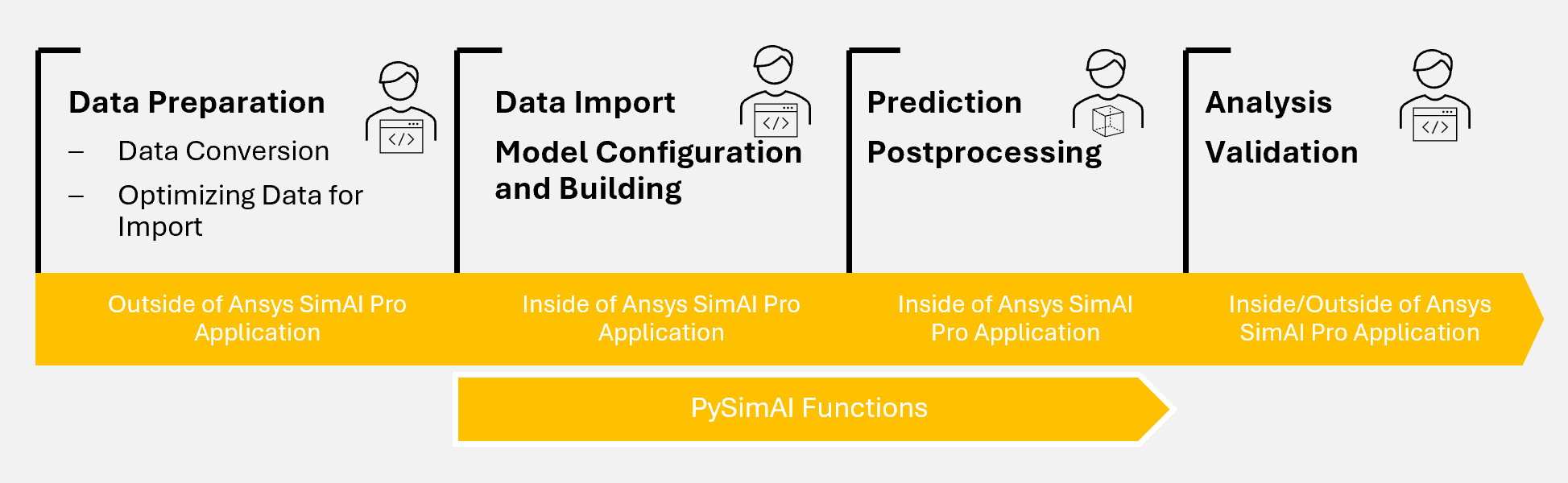
Data Preparation: To be as agnostic as possible, the Ansys SimAI Pro application only ingests neutral formats as input. Simulation data coming from your solvers must be exported or converted into that format. For more information, see Data Preparation.
Data Import, and Model Configuration and Building: Once your data are imported, you can move onto the AI model building process. Consult Model Building to cover all the steps related to the creation of your AI model. From model settings definition to model building.
Prediction and Postprocessing: Once your AI model is built, you can use it to perform predictions on your design geometries. Some postprocessing actions are also available to you to either get a quick insight and indicators on your model’s performance or to download relevant outputs for further postprocessing outside of the Ansys SimAI Pro application. For more information, see Prediction.
Analysis and Validation: Use the Model Evaluation Report and other postprocessing capabilities available to analyze your model, identify potential failing designs and how to alter your model settings or training data to improve performance. When you have a model that performs as you expect it, validate your best performing designs with full fidelity simulations. For more information, see Analysis.